
Before You Build the Async System, Run This Math

Souhardo Rahman
Software Developer

Building architecture is hard. Someone draws boxes and arrows, names a queue, adds a database, and the design is done. The system ships. Traffic ramps. And then, with a sizable user base and active usage, the daily job budget runs out and you're scrambling to scale a system that never had a capacity plan.
On a project at Ledgercross, I nearly made this exact mistake. Three weeks into building our async pipeline for a project, I skipped what should have been the first step: proper async system capacity planning.
The result? A system that couldn't handle the load we were planning for.
The architecture diagram looked fine. Boxes, arrows, a queue, a database. But nobody had asked the basic question: can this system handle our actual users doing their actual jobs?
I got lucky. I caught it before it shipped. But luck is a terrible quality gate, and most teams don't catch these problems until the system is already live and under pressure. I spent the next few weeks going layer by layer through every part of the system:
- Queue pressure
- Worker sizing
- Database load
- Overload behavior
The math took longer than it should have, mostly because I was figuring it out as I went. This is that math, written so you don't have to go through the same thing.
Size for peak, not average. They differ by 3x.
For our system, three inputs drove everything:
daily_users           = 50,000
jobs_per_user_per_day = 4
peak_factor           = 3
Which gives:
daily_jobs    = 50,000 × 4       = 200,000 jobs/day
avg_jobs/sec  = 200,000 ÷ 86,400 = 2.3 jobs/sec
peak_jobs/sec = 2.3 × 3          = 6.9 jobs/sec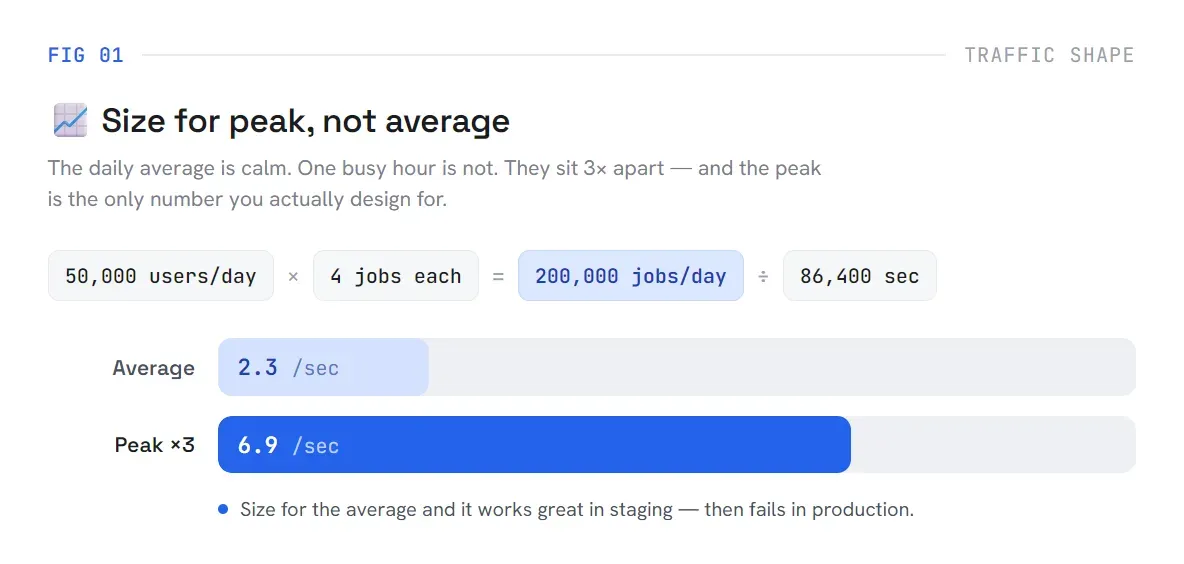
The number that matters is 6.9, not 2.3. Your daily average is what the system handles most of the time. One busy lunch hour is not most of the time, but it is when your system fails if you designed for average. I had been looking at average load and thinking we had headroom. We didn't.
Your system has four budgets. The tightest one breaks first.
Capacity isn't a single limit. It's a set of limits with different amounts of slack, and they fail independently:
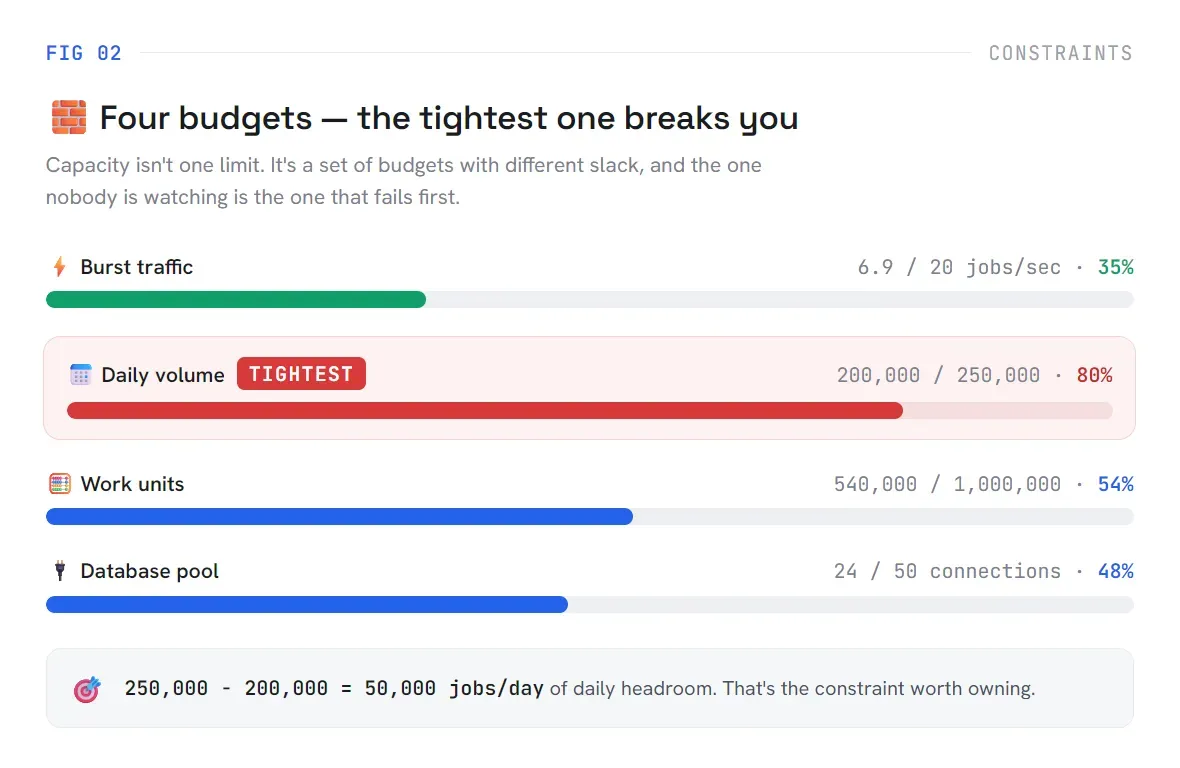
Burst capacity looked fine: 6.9 against a ceiling of 20. But daily volume was already at 80% of budget. That's the constraint worth owning.
It's tempting to feel reassured by the numbers that have room to spare. A budget with headroom tells you nothing about the one that's about to run out. The system fails as fast as its weakest constraint, not its healthiest one.
Workers aren't sized on throughput. They're sized on concurrency.
This one took me a while to internalize. When you're building a synchronous API, more requests per second means you need more capacity. Async work doesn't work that way.
What matters is how many jobs are running at the same time, not how fast they're arriving:
If each job takes 30 seconds and you're getting 6.9 jobs/sec at peak, you have roughly 207 concurrent jobs running at any given moment. That's what sets your worker floor, not the per-second arrival rate.
Running workers at 100% utilization makes this worse. A single slow job cascades into retries and queue depth grows. Target 85%:
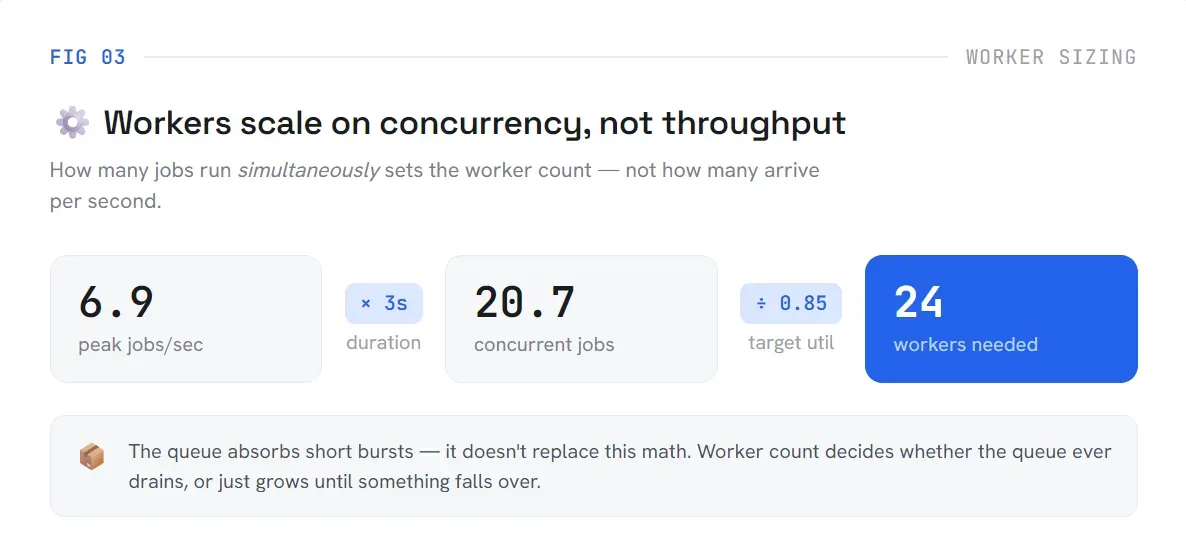
The queue doesn't fix an undersized worker pool. A queue that isn't draining can look fine for hours. By the time depth becomes alarming, the worker shortfall has usually existed since the first traffic spike.
Add one more processor than you think you need.
If each processor safely handles 4 concurrent jobs and you need 25 workers total at 85% utilization, you need 7 processors. The seventh one is what keeps the system alive during a rolling deploy, a crash, or a processor running hot.
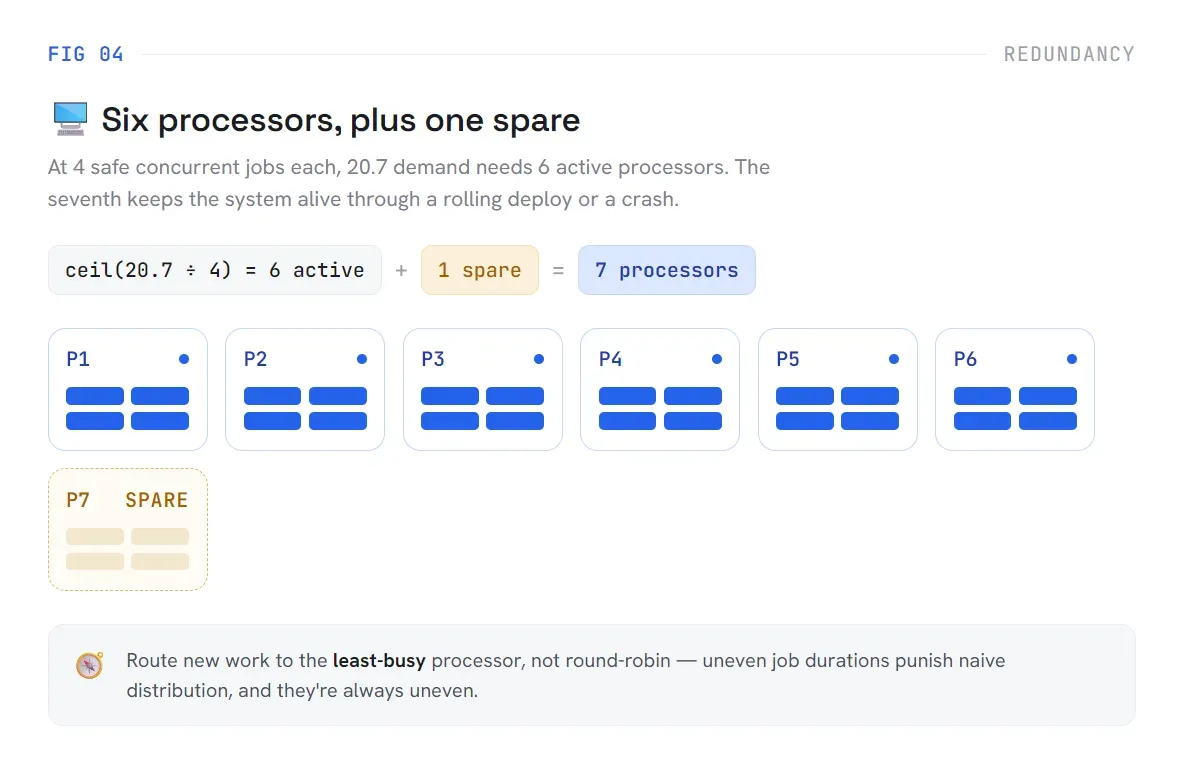
That seventh processor is what keeps the system alive during a rolling deploy, a crash, or a processor running hot. It's also why you route new work to the least-busy processor instead of round-robining.
Round-robin assumes every job costs roughly the same, which is rarely true once real payloads show up. A handful of long-running jobs land on the same processor by chance, and that processor quietly falls behind while its neighbors sit idle.
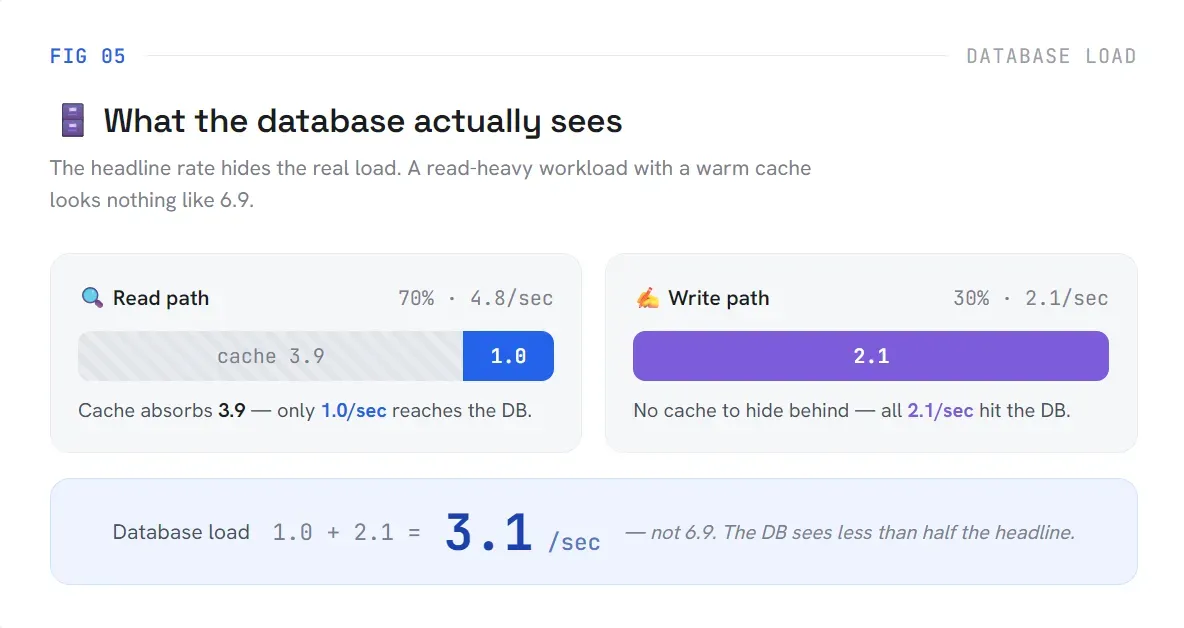
The headline request rate hides what's actually happening to your database.
At 6.9 peak jobs/sec, I assumed the database was seeing roughly 6.9 requests/sec. It wasn't close. When you split traffic by type and account for cache hit rates:
read_ratio     = 70%
cache_hit_rate = 80%
write_ratio    = 30%
At 6.9 peak jobs/sec:
reads_per_second          = 6.9 × 0.7  = 4.8
cache_hits_per_second     = 4.8 × 0.8  = 3.9
database_reads_per_second = 4.8 - 3.9   = 1.0
writes_per_second         = 6.9 × 0.3  = 2.1
The database sees 3.1 requests/sec, not 6.9. Reads with a warm cache mostly disappear. Writes don't. Connection pools, lock contention, and transaction overhead all track the write number far more closely than the headline figure. If you're sizing connections from total traffic, you're optimizing for something that doesn't exist.
Per-user limits are not a UX decision. They're a capacity decision.
With a shared daily budget of 250,000 jobs:
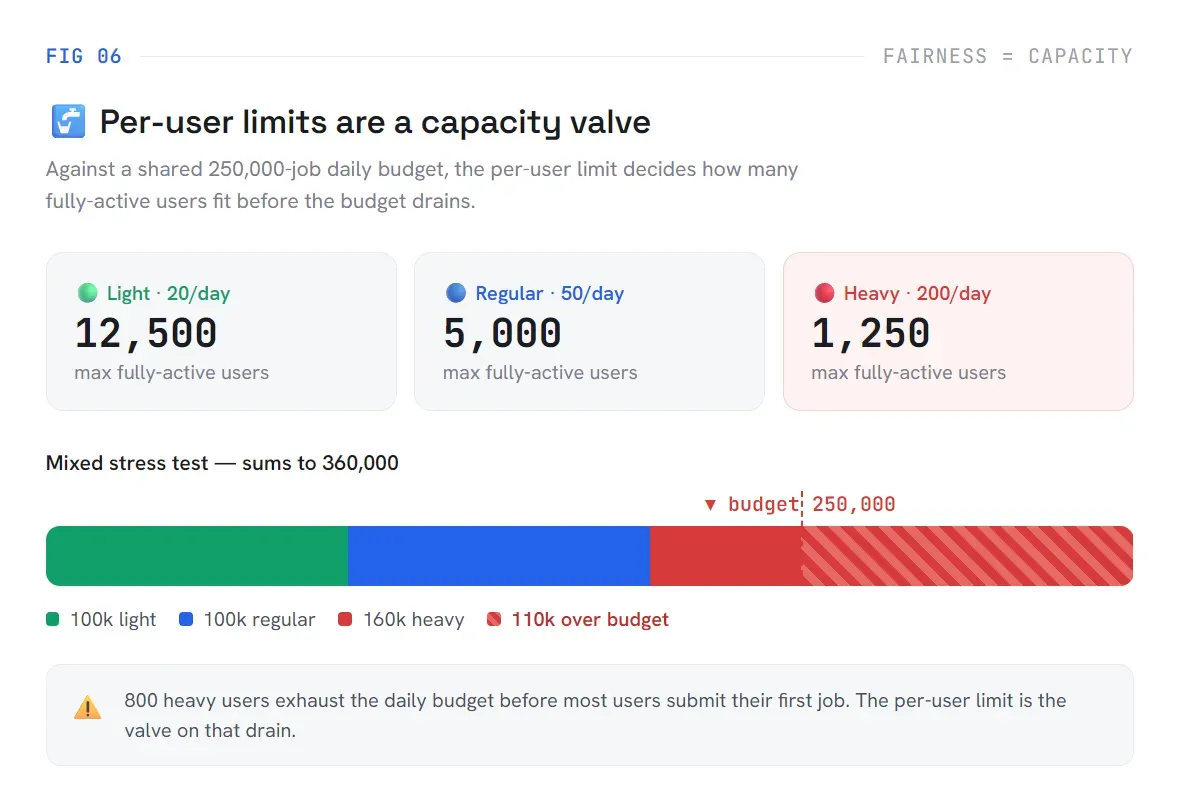
The stress scenario that actually matters:
5,000 light users   × 20  = 100,000
2,000 regular users × 50  = 100,000
  800 heavy users   × 200 = 160,000
Eight hundred heavy users can exhaust the entire day's budget before most people have submitted their first job. The per-user limit is the valve that prevents this. Without it, a handful of power users or one misbehaving integration consumes everything, and everyone else hits errors they didn't cause.
This gets worse as workloads get more expensive. If you're running AI inference as part of your async jobs, the cost gap between user tiers widens fast. The numbers on what AI actually costs per job change the urgency of setting these limits.
Design what happens when the system hits its limits.
Every system has a saturation point. The question isn't whether it'll be reached. The question is whether you decided what happens when it is, or left that to whichever component fails first.
| Signal             | Behavior                  |
|--------------------|---------------------------|
| Queue age < 10s    | Accept normally         ✅|
| Queue age = 10-60s | Queue and show status   🟨|
| Queue age > 60s    | Delay low-priority job  🟧|
| Budget    < 5%     | Reject with retry-after 🟥|
Explicit backpressure makes saturation visible instead of silent. An undesigned overload response isn't no behavior. It's behavior chosen by whichever component happened to fail first, and that's rarely the outcome you'd have picked on purpose.
The async system capacity plan
I compress this to a single figure so I can change one input and immediately see what shifts downstream. This is the core of any async system capacity planning exercise:
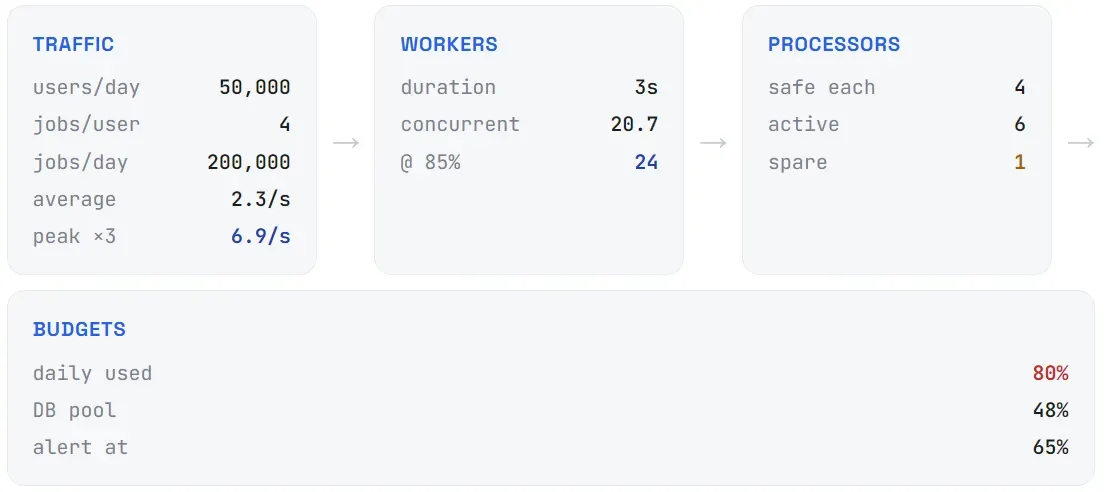
That's the actual point. Not the specific numbers. Making the dependencies between them legible before anyone writes code. Whether you're building a background job queue, running AI inference tasks, or designing for infrastructure that scales beyond traditional cloud limits, the math runs the same way.
What I instrument from day one
These assumptions tell me exactly what to watch from launch:
1. accepted & completed jobs per minute
2. queue depth
3. oldest job age
4. worker utilization
5. job duration percentiles
6. daily budget remaining
7. database connection usage
8. retry and failure rates
When production disagrees with the model, I update the assumptions. I'm not trying to be right on day one. I'm trying to make sure users don't find the system's limits before I do.
So what happened to the project?
The product is now finished, and every capacity concern discussed here has been addressed carefully. From queue pressure and worker sizing to database load, user limits, overload behavior, and production monitoring, we made sure the system is ready for real users, real traffic, and real operational pressure.
Here's a tiny sneak peek at the spirit of the product, our eye-patched ghost detective! 👻

Look forward to its unveil from Ledgercross.
And if you have something you want built, try our consultation. Let’s plan it properly, build it carefully, and bring it to life together.
Last updated: June 2026